
Functions and Modes
Level Mode
The level mode is the default mode for selecting collections and problems. Based on the difficulty of the problem, a certain amount of
experience points (XP) is the reward. The users start at level 1 and reach higher levels by gaining XP. There are several rewards upon reaching
higher levels. The number of hearts increases. Hero powers, secret areas and the sandbox can be unlocked.
Problem page

(1) Hearts
The hearts are your lives that you have for trying to solve the problems. Each time you fail at solving a problem, you lose a heart. When you have no hearts left and fail at a problem, the problem is locked until the next day. Hearts increase with your level.
(2) Hero Powers
(3) Player color and board orientation
The icons show the current player color and board orientation. You can also select your preferred color and orientation.
(4) Mark as favorite
By selecting the gray circle, the problem is marked as favorite. It can be found in the favorite collection that shows up at the beginning of the collections page.

(5) Problem colors
Problem page
(1) Hearts
The hearts are your lives that you have for trying to solve the problems. Each time you fail at solving a problem, you lose a heart. When you have no hearts left and fail at a problem, the problem is locked until the next day. Hearts increase with your level.
(2) Hero Powers

|
Sprint (Level 20) Double XP for 2 minutes on all solved problems. |

|
Intuition (Level 30) Shows the first correct move. |

|
Rejuvenation (Level 40) Restores health, Intuition and locks. |

|
Potion (Level 50 or Premium) If you misplay and have no hearts left, you have a small chance to restore your health. |

|
Refinement (Level 100 or Premium) Gives you a chance to solve a golden tsumego. |
(3) Player color and board orientation
The icons show the current player color and board orientation. You can also select your preferred color and orientation.
(4) Mark as favorite
By selecting the gray circle, the problem is marked as favorite. It can be found in the favorite collection that shows up at the beginning of the collections page.
(5) Problem colors
| Not visited |
You haven't seen this problem yet. |
| Visited |
You have seen this problem but have not solved it. |
| Solved |
You got it right. It gives no more XP and becomes available for Review after one week. |
| Locked |
You can't play this problem today after misplaying with no hearts left. It resets to Visited tomorrow. |
| Review |
A week has passed since you solved this. Solve it for half XP. Get it right and it becomes Mastered, fail and it becomes Forgotten. |
| Mastered |
You passed the review. It gives no more XP. |
| Forgotten |
You failed a Review. You are locked out for today. It resets to Review tomorrow. |
| Golden |
You have one attempt at 8x XP. Created by activating the Refinement hero power. |
Rating Mode
In the rating mode, problems get chosen according to your rating. The rating is a number that corresponds to a problem difficulty and
starts at 20 kyu (100 rating). By solving or failing problems, the rating number increases or decreases.
Problem page

(1) Horizontal bar
The horizontal bar that reaches from very easy to very difficult influences the difficulty of the problems that you get. Very easy gives you problems that are below your rating, very difficult gives you problems that have a higher rating.
(2) History button
The history button leads you to the page that shows your most recent attempts in the rating mode.
(3) Skip button
The skip button lets you skip the problem without trying to solve it. It can be used 30 times per day.
Rating mode history page

The rating mode history page shows your most recent attempts in the rating mode. You can see how much rating you gained or lost and you can go to the problem to try it again.
Problem page
(1) Horizontal bar
The horizontal bar that reaches from very easy to very difficult influences the difficulty of the problems that you get. Very easy gives you problems that are below your rating, very difficult gives you problems that have a higher rating.
(2) History button
The history button leads you to the page that shows your most recent attempts in the rating mode.
(3) Skip button
The skip button lets you skip the problem without trying to solve it. It can be used 30 times per day.
Rating mode history page
The rating mode history page shows your most recent attempts in the rating mode. You can see how much rating you gained or lost and you can go to the problem to try it again.
Time Mode
In the time mode, you are challenged with 10 problems of a selected rank. If you solve enough of them correctly,
you unlock the next rank. All problems are categorized into ranks from 15 kyu to 5 dan. You start at problems of the
rank 15 kyu and unlock a stronger rank upon passing the current rank.
Select page

The icon on the bottom left shows your best attempt. It shows your best score and if you passed or failed. The icon on the right shows how many problems on that rank are in the database.
Select between 3 categories:
• Slow: 4 Minutes per problem, 8/10 to pass
• Fast: 1 Minute per problem, 8/10 to pass
• Blitz: 30 Seconds per problem, 8/10 to pass
Problem page
After a category is selected, it is time to solve the problems.

(1) Number of problems in current session
The numbers show how many problems you solved in this session and how many problems are overall in this session.
(2) Countdown
A countdown is shown on the upper left. When it runs out before solving, you failed the problem.
Results page

On the results page, you have your attempts listed. For each rank in each category, your best attempt is shown. The possible range of points for each problem is 0 to 100. A faster solving time gets more points and a failed attempt always gives 0 points.
Select page
The icon on the bottom left shows your best attempt. It shows your best score and if you passed or failed. The icon on the right shows how many problems on that rank are in the database.
Select between 3 categories:
• Slow: 4 Minutes per problem, 8/10 to pass
• Fast: 1 Minute per problem, 8/10 to pass
• Blitz: 30 Seconds per problem, 8/10 to pass
Problem page
After a category is selected, it is time to solve the problems.
(1) Number of problems in current session
The numbers show how many problems you solved in this session and how many problems are overall in this session.
(2) Countdown
A countdown is shown on the upper left. When it runs out before solving, you failed the problem.
Results page
On the results page, you have your attempts listed. For each rank in each category, your best attempt is shown. The possible range of points for each problem is 0 to 100. A faster solving time gets more points and a failed attempt always gives 0 points.
Mistake Training
A problem goes to the mistake training when you solve it but had made a mistake first, or when you make a mistake on
a problem you had solved before and that is waiting for its review or forgotten. A problem you solved is yours to
play with freely in the level and rating modes: nothing you do on it there changes the training, unless it is due
for review that day. In the time mode it is played against the clock like any other, so a mistake there counts.
Every clean solve pushes the next review further away: a day, then two, four, eight and fifteen days, then a month, two months and four months. Eight clean solves and the problem leaves the training. A mistake sends it back to the bottom, however far it had got, and it stays in today's training until you solve it. That solve earns nothing and the problem comes back the next day.
A mistake also tells the training that the problem is hard for you, so from then on its reviews move away more slowly: after one mistake the waits are a quarter shorter, and every further mistake shortens them again, down to half of the waits above. While a problem is due, the tries that fail before you solve it count as one mistake.
XP
A clean solve of a problem that is due earns 20% of the XP the problem gives in the level mode, and graduating it another 50%. Solving the last problem due clears the day, and when the day's training held at least 5 problems that earns a bonus of 50% of what the day's reviews earned, once a day. A solve after a mistake, a replay of a problem you solved today and a problem that is not due earn nothing, so a mistake made on purpose does not pay. The XP of the training counts only when you play from the training, and hero powers and the sprint do not multiply it. Your profile shows the training days of the last half a year and your streak of cleared days. A day with problems due that you do not clear ends the streak; a day with nothing due keeps it, without adding to it.
The training does not change your rating, it does not cost hearts and it does not use hero powers. It does not change the status of a problem either: a problem you solved in the level mode stays solved. A mistake locks the board, and Reset gives you the next try.
Problem page
The Mistake Training card on the homepage says how many problems wait for review today and opens the training. A problem is played as training only when you open it from there. Opened from a collection, it is played normally, with XP and hearts. Played that way before its review day, a clean solve does not move it up the training, but a mistake on a problem waiting for its review or forgotten still sends it back to the bottom.
The buttons under the board are today's training, and they keep their order the whole day. A grey button is still waiting, a green one is solved today. The badge under the number is the rung of the problem, like a military rank: one to four chevrons for a fresh mistake and the first reviews, one to four stars for the last reviews before graduation, and a crown marks a problem that graduated today. The tooltip of a button names the rung and says when the problem comes back. Next skips what you solved already and, after the last problem of the day, leads to the page that says you are done. A solved problem played again from the row does not count.
All caught up
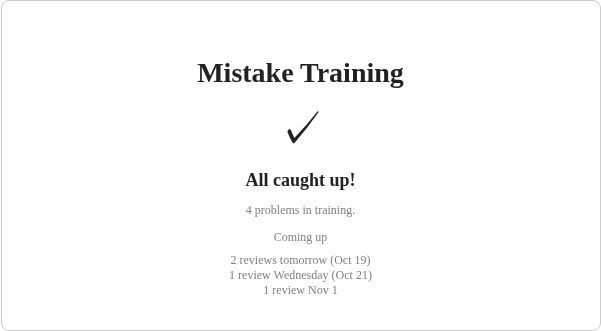
When nothing is due, the page shows what you solved today and when the problems in the training come back.
Past mistakes
Problems you solved with a mistake before the training existed did not enter it by themselves. Whenever nothing is due, the page offers the 10 most recent of them, ready to play straight away.
Every clean solve pushes the next review further away: a day, then two, four, eight and fifteen days, then a month, two months and four months. Eight clean solves and the problem leaves the training. A mistake sends it back to the bottom, however far it had got, and it stays in today's training until you solve it. That solve earns nothing and the problem comes back the next day.
A mistake also tells the training that the problem is hard for you, so from then on its reviews move away more slowly: after one mistake the waits are a quarter shorter, and every further mistake shortens them again, down to half of the waits above. While a problem is due, the tries that fail before you solve it count as one mistake.
XP
A clean solve of a problem that is due earns 20% of the XP the problem gives in the level mode, and graduating it another 50%. Solving the last problem due clears the day, and when the day's training held at least 5 problems that earns a bonus of 50% of what the day's reviews earned, once a day. A solve after a mistake, a replay of a problem you solved today and a problem that is not due earn nothing, so a mistake made on purpose does not pay. The XP of the training counts only when you play from the training, and hero powers and the sprint do not multiply it. Your profile shows the training days of the last half a year and your streak of cleared days. A day with problems due that you do not clear ends the streak; a day with nothing due keeps it, without adding to it.
The training does not change your rating, it does not cost hearts and it does not use hero powers. It does not change the status of a problem either: a problem you solved in the level mode stays solved. A mistake locks the board, and Reset gives you the next try.
Problem page
The Mistake Training card on the homepage says how many problems wait for review today and opens the training. A problem is played as training only when you open it from there. Opened from a collection, it is played normally, with XP and hearts. Played that way before its review day, a clean solve does not move it up the training, but a mistake on a problem waiting for its review or forgotten still sends it back to the bottom.
The buttons under the board are today's training, and they keep their order the whole day. A grey button is still waiting, a green one is solved today. The badge under the number is the rung of the problem, like a military rank: one to four chevrons for a fresh mistake and the first reviews, one to four stars for the last reviews before graduation, and a crown marks a problem that graduated today. The tooltip of a button names the rung and says when the problem comes back. Next skips what you solved already and, after the last problem of the day, leads to the page that says you are done. A solved problem played again from the row does not count.
All caught up
When nothing is due, the page shows what you solved today and when the problems in the training come back.
Past mistakes
Problems you solved with a mistake before the training existed did not enter it by themselves. Whenever nothing is due, the page offers the 10 most recent of them, ready to play straight away.
